

SSO Integration
Configure Single Sign-On (SSO) for the Granica platform using OIDC or SAML 2.0.
Granica supports Single Sign-On (SSO) via two industry-standard protocols: OpenID Connect (OIDC) and SAML 2.0. Once configured, users authenticate through your existing identity provider rather than managing separate Granica credentials.
Supported protocols
OpenID Connect (OIDC)
OIDC is an identity layer built on top of OAuth 2.0. Granica acts as a confidential OIDC client using the Authorization Code flow. Configuration requires a Discovery URL (.well-known/openid-configuration), a Client ID, and a Client Secret.
Supported OIDC identity providers:
| Identity Provider | Setup Guide |
|---|---|
| Okta | Implement Authorization Code with PKCE |
| Microsoft Entra ID | Register an app in Entra |
| Google Workspace | OpenID Connect on Google |
| Auth0 | Application Settings |
| AWS IAM Identity Center | Configure OIDC grant |
| Keycloak | Use the standard OIDC discovery URL from your Keycloak realm. |
| Custom / Generic | Any OpenID Connect Core 1.0 compliant provider. |
SAML 2.0
Granica acts as a SAML Service Provider (SP). Configuration requires importing IdP metadata (via URL or XML file) and registering Granica's SP metadata with your identity provider.
Supported SAML 2.0 identity providers:
| Identity Provider | Setup Guide |
|---|---|
| Okta | Configure via SP metadata URL or XML upload in Okta Admin Console under Applications → SAML Settings → Edit → Configure SAML. |
| Microsoft Entra ID | Configure via Entra Enterprise Application SAML blade — Enterprise Applications → Single sign-on → SAML → Basic SAML Configuration. |
| Google Workspace | Configure via Apps → Web and mobile apps → Add custom SAML app in Google Admin Console. Note: assertion encryption is not supported for Google Workspace SAML. |
| Auth0 | Configure via Applications → Addons → SAML2 Web App → Settings by pasting the Granica-generated JSON. |
| AWS IAM Identity Center | Configure via Applications → Add custom SAML 2.0 application by uploading Granica's SP metadata XML. Note: users must be pre-provisioned in Granica before they can sign in (SCIM auto-provisioning is not supported). |
| Custom / Generic | Any SAML 2.0-compliant provider. Use the raw SP values (Entity ID, ACS URL, SLO URL, SP certificate) or download the SP metadata XML. |
Configuration steps
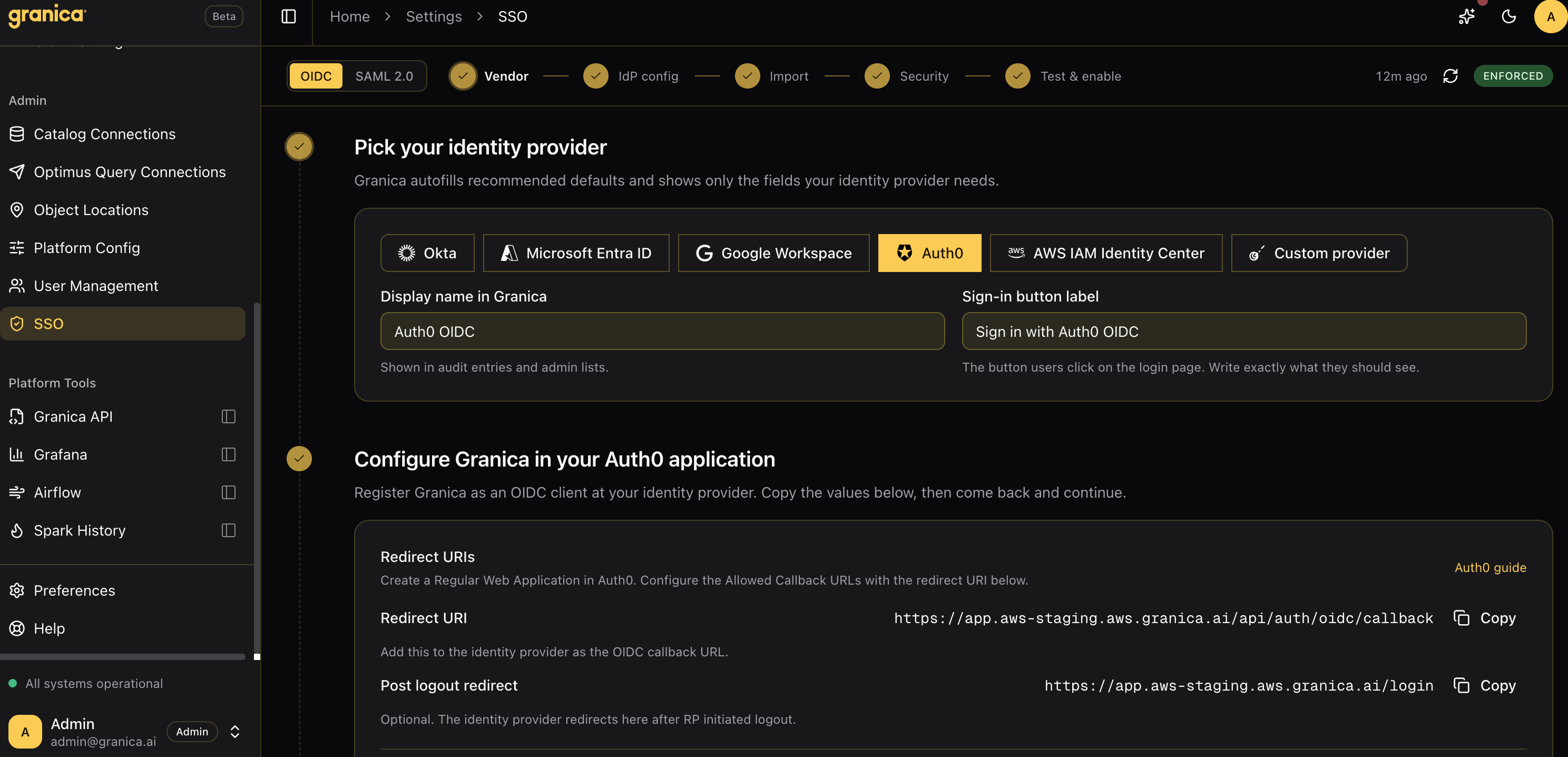
SSO is configured in the Granica Console under Settings → SSO. The wizard walks through five steps:
- Vendor — Pick your identity provider. Granica autofills recommended defaults and shows only the fields your provider needs.
- IdP config — Register Granica as a client or SP in your identity provider using the values provided (redirect URIs, ACS URL, Entity ID, metadata URL, etc.).
- Import — Import your identity provider's metadata back into Granica (discovery URL for OIDC, or IdP metadata URL/XML for SAML).
- Security — Review signing and encryption settings. Granica signs outbound requests by default for SAML; encryption settings can be adjusted here.
- Test & enable — Run a test login to verify the configuration before enabling SSO for all users.
Break-glass access
Granica supports designated break-glass users who can always log in with local credentials, even if SSO is misconfigured or your identity provider is unavailable. Configure break-glass users in Settings → SSO before enforcing SSO to ensure you are never locked out.
Enforcement modes
| Mode | Description |
|---|---|
| Disabled | SSO is not active. Users log in with local credentials. |
| Test | SSO is configured and can be tested, but local login remains available for all users. |
| Enforced | All users must authenticate via SSO. Local login is disabled except for break-glass users. |
Role-Based Access Control
Manage who can view, configure, and administer your Granica deployment using role-based access control.
API Keys
Create and manage API keys for machine-to-machine access to the Granica API.