

Connect Query History
Set up daily query history ingestion from Trino, Spark, and Athena to power Query Acceleration recommendations.
Query History Connections tell Granica where to find your engine's query logs. Granica reads those logs daily, analyzes query patterns, and surfaces Query Acceleration recommendations — such as optimal sort keys, Z-ordering, and file right-sizing — for your most frequently queried tables.
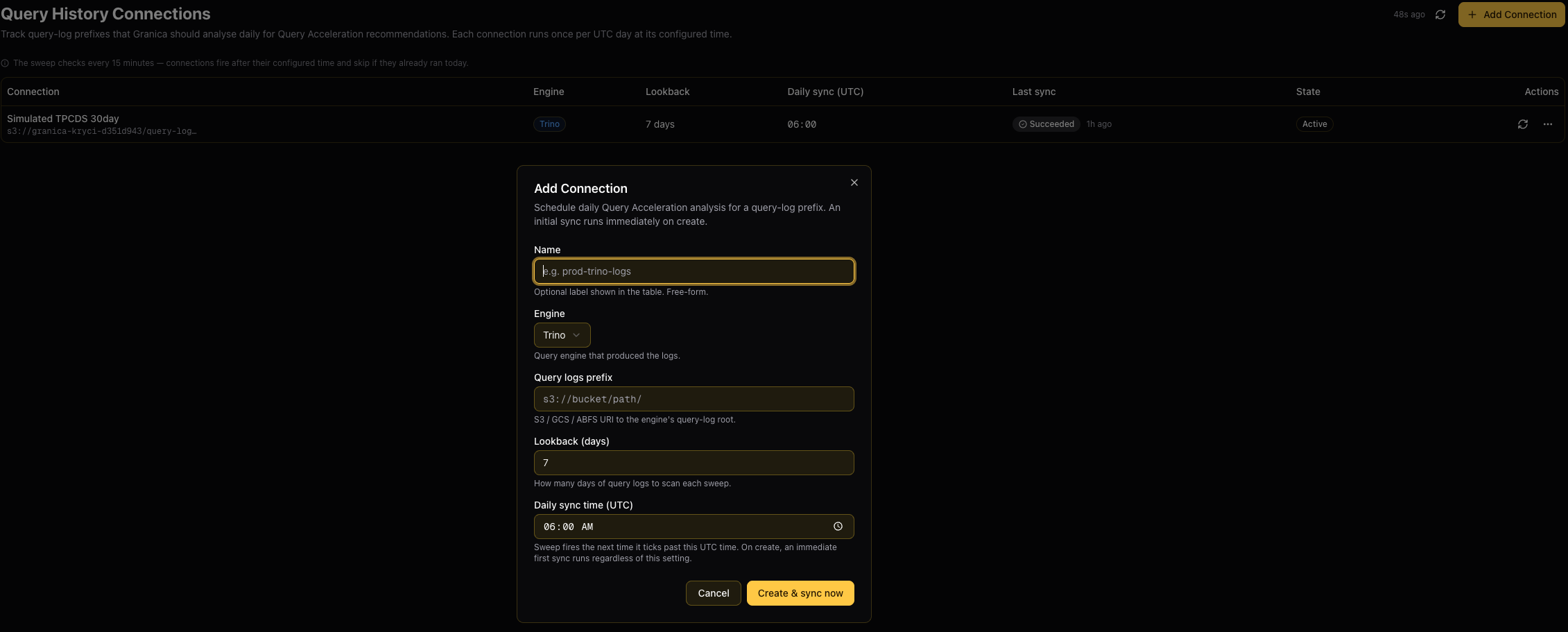
Each connection targets a single query-log prefix (S3, GCS, or ABFS) and runs once per UTC day at a configured time. An initial sync runs immediately when a connection is created.
Query History Connections require Admin access. Viewers and Editors cannot create or manage connections.
Supported engines
| Engine | Log format | Notes |
|---|---|---|
| Trino | Trino event listener logs | Point to the root prefix where Trino writes its query event JSON files |
| Spark | Spark event logs | Point to the Spark History Server log directory (e.g. the eventlog prefix on S3/GCS) |
| Athena | Athena query execution history | Point to the S3 prefix where Athena writes query results and execution metadata |
Add a connection
- Navigate to Query History Connections in the Granica Console sidebar.
- Click Add Connection.
- Fill in the connection form:
| Field | Description |
|---|---|
| Name | Optional label shown in the connections table (e.g. prod-trino-logs). If left blank, Granica uses the last segment of the log prefix URI. |
| Engine | The query engine that produced the logs: Trino, Spark, or Athena. |
| Query logs prefix | S3, GCS, or ABFS URI pointing to the root of the engine's query log output (e.g. s3://my-bucket/trino-logs/). |
| Lookback (days) | How many days of query logs to scan on each daily run. Range: 1–365 days. Default: 7 days. |
| Daily sync time (UTC) | The UTC time at which the daily sync should run (e.g. 06:00). The scheduler checks every 15 minutes and fires the sync the first time it ticks past this time. |
- Click Create & sync now.
Granica immediately starts an initial sync regardless of the configured daily sync time. Subsequent syncs run daily at the configured UTC time.
Monitor connections
The connections table shows the status of each configured connection:
| Column | Description |
|---|---|
| Connection | The connection name (or log prefix if no name was set) and the full URI |
| Engine | The query engine type (Trino, Spark, or Athena) |
| Lookback | The number of days of logs scanned per run |
| Daily sync (UTC) | The scheduled time for the daily sync |
| Last sync | Status of the most recent run: Never synced, Syncing, Succeeded, or Failed (hover over Failed for the error detail) |
| State | Active or Paused |
While a sync is in progress, the Last sync column shows Syncing with a spinner. The table auto-refreshes every 5 seconds when any sync is running.
Manage connections
Click the ⋯ menu on any connection row to access management options:
- Edit — Update the name, log prefix, engine type, lookback window, or sync time. Changes take effect on the next sweep tick.
- Pause / Resume — Suspend daily syncs without deleting the connection. Paused connections are dimmed in the table and cannot be manually synced.
- Delete — Permanently remove the connection and all associated historical recommendations. This cannot be undone.
To trigger an immediate sync outside of the scheduled time, click the sync (↻) icon on any active connection row.
Log prefix requirements
Granica needs read access to the configured log prefix in your cloud storage. Ensure the IAM role or service account used by Granica's data plane has s3:GetObject / storage.objects.get permissions on the log bucket.
Trino
Configure Trino's event listener to write query events to a cloud storage prefix. Point the connection at the root of that prefix.
Spark
Set spark.eventLog.enabled=true and spark.eventLog.dir=s3://your-bucket/spark-logs/ in your Spark configuration. Point the connection at the same spark.eventLog.dir prefix.
Athena
Athena writes query execution metadata to the Query result location configured in your workgroup settings. Point the connection at that S3 prefix (e.g. s3://your-bucket/athena-results/).
See also
Use Platform Tools
Access the Granica API explorer, Grafana dashboards, Airflow DAG scheduler, and Spark History Server directly from the Granica Console.
Connect Object Stores
Register S3, GCS, or Azure prefixes so Granica can discover and optimize objects that live outside your data catalogs.