

Connect Object Stores
Register S3, GCS, or Azure prefixes so Granica can discover and optimize objects that live outside your data catalogs.
Object Locations is where you register the cloud storage prefixes that Granica should track and optimize. While Catalog Connections handle tables registered in Unity Catalog, Hive Metastore, or Polaris, Object Locations covers everything else — raw JSON event files, unregistered Parquet dumps, archive prefixes, and any other data that lives in your object store but is not claimed by a catalog.
Once a location is registered, Granica discovers the prefixes within it and makes them available for compression, compaction, vacuum, and orphan file deletion — the same operations it applies to catalog-managed tables.
Object Locations is an experimental feature. The initial release supports JSON input (converted to Parquet on output). Parquet-to-Parquet optimization is coming soon.
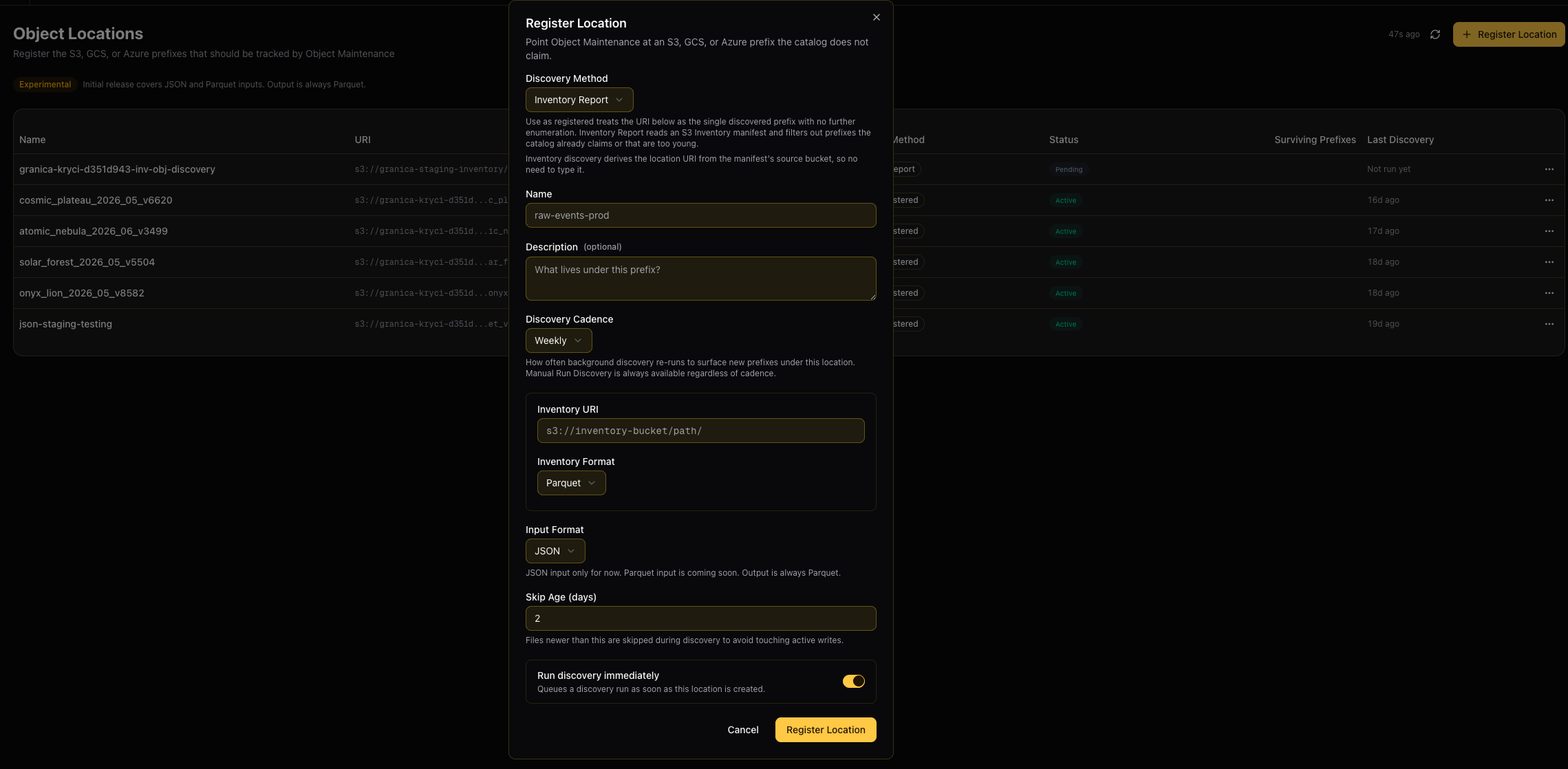
Location table
The Object Locations page lists all registered locations with the following columns:
| Column | Description |
|---|---|
| Name | Friendly label for the location |
| URI | The cloud storage prefix being tracked (s3://, gs://, or azure://) |
| Method | How Granica discovers prefixes within this location |
| Status | Pending, Discovering, Active, or Archived |
| Surviving Prefixes | Number of prefixes discovered and accepted after filtering |
| Last Discovery | Timestamp of the most recent discovery run |
Register a location
Click + Register Location to open the registration dialog.
Discovery Method
The discovery method controls how Granica enumerates the prefixes within your registered location.
Use as Registered
Treats the URI you provide as a single, exact prefix with no further enumeration. Granica takes it at face value and begins optimizing objects immediately. Use this when you already know the precise prefix you want to manage.
- No additional discovery runs are scheduled.
- The URI field is required — provide the full
s3://,gs://, orazure://path.
Inventory Report
Uses a pre-generated cloud storage inventory manifest (such as an S3 Inventory report) to enumerate all objects under a bucket. Granica reads the manifest, filters out any prefixes already claimed by your catalogs or that contain files too young to touch, and produces a clean list of surviving prefixes to optimize.
Inventory Report is the recommended method for large buckets. It is far more efficient than scanning the bucket directly — cloud-native inventory exports are pre-computed by the storage provider and avoid the per-object API calls that make direct listing slow and expensive.
Inventory manifests registered here are also used by other Granica features, including vacuum and orphan file deletion, so a single inventory location serves multiple optimization workflows.
Additional fields for Inventory Report:
| Field | Description |
|---|---|
| Inventory URI | URI of the inventory manifest destination (e.g. s3://inventory-bucket/path/). Granica reads the manifest from this location. The source bucket URI is derived automatically from the manifest — you do not need to enter it separately. |
| Inventory Format | Format of the manifest files. Parquet is supported today; ORC and CSV are coming soon. |
| Discovery Cadence | How often Granica re-reads the manifest to surface newly appeared prefixes: Daily or Weekly. You can always trigger a manual discovery run regardless of cadence. |
| Skip Age (days) | Files newer than this threshold are excluded from discovery to avoid interfering with active writes. Default is 2 days. Valid range: 0–365. |
| Run discovery immediately | When enabled, Granica queues a discovery run as soon as the location is created. Defaults to on for Inventory Report so you can validate the manifest end-to-end right away. |
Listing (coming soon)
Direct bucket listing via cloud storage APIs. This method will enumerate all objects by scanning the bucket in real time. It is simpler to configure than Inventory Report but significantly slower and more expensive for large buckets. Recommended only for small prefixes or when an inventory export is not available.
Name and Description
Give the location a descriptive Name (up to 100 characters) that identifies its purpose, such as raw-events-prod or archive-data-us-east. An optional Description (up to 500 characters) is useful for documenting what data lives under the prefix.
Input Format
Specifies the file format of objects in the registered location.
| Format | Status |
|---|---|
| JSON | Supported — Granica reads JSON files and converts output to Parquet |
| Parquet | Coming soon |
Output is always Parquet regardless of input format.
Register Location
Click Register Location to save. If Run discovery immediately is enabled, Granica starts a discovery run in the background. The location status changes from Pending to Discovering and then to Active once the first discovery run completes and surviving prefixes are identified.
Manage locations
Click any row in the location table to open a details panel showing the full configuration, discovered prefixes, and discovery run history.
From the ⋯ Actions menu on any row you can:
- Edit — Update the location name, description, or cadence.
- Run Discovery — Trigger an immediate discovery run outside the scheduled cadence.
- Archive — Stop tracking and optimizing this location. Archiving does not delete any data. Archived locations can be viewed but are no longer processed.
How discovery filtering works
When Granica processes an inventory manifest or listing, it applies several filters before accepting a prefix as a surviving location:
| Filter | Reason |
|---|---|
| Catalog claimed | Prefixes already managed by a connected catalog are excluded — they are handled through table-level policies instead. |
| Too young | Files newer than the Skip Age threshold are excluded to avoid touching data that is still being actively written. |
| Empty | Prefixes containing no data files are skipped. |
| Non-data files | Prefixes containing only metadata, manifest, or other non-data files are excluded. |
| Below size threshold | Very small prefixes below the minimum optimization threshold are skipped. |
Only prefixes that pass all filters appear as surviving prefixes and are queued for optimization.
Connect Query History
Set up daily query history ingestion from Trino, Spark, and Athena to power Query Acceleration recommendations.
Granica APIs V1
REST API reference for the Granica platform — tables, schedules, crunch, vacuum, catalog connections, Optimus, object maintenance, and more.