

How crunching works
Understand how Crunch optimizes compression for your lakehouse data.
Once you've deployed Granica into your cloud environment, it's time to get crunching. "Crunching" is our euphemism for data processing in the context of compression optimization, where we "crunch" the data down to its purest information-rich state.
Crunch is initiated by setting a policy on a table through the Granica Console or directly through the Granica API. Once a policy is active, Crunch runs continuously in the background without any further manual steps.
Production lakehouse data
Production lakehouse data is the columnar data your teams are generating and working with every day. Crunch offers two mechanisms to compress and optimize that data:
| Runtime Crunch | Background Crunch | |
|---|---|---|
| Optimizes incoming data (as written) | Yes | No |
| Optimizes existing data | No | Yes |
| Continuously learns from data | Yes | No |
| Compatibility | Apache Spark (Flink and Trino coming soon) | Apache Spark on EMR, Dataproc, HDInsight, and self-managed clusters (Flink and Trino coming soon) |
| Availability | Early access | Now |
Crunch lexicon
- Crunched buckets — buckets under active management, processing, and monitoring by Crunch
- Crunched objects — objects evaluated by Crunch for compression optimization
- Vanilla buckets — buckets that have not been crunched
- Vanilla objects — objects that have not been crunched
- Ingested objects — crunched and reduced (background mode only)
- Analyzed objects — crunched and analyzed to generate optimal recipes (runtime mode only)
Background crunch write workflow
This is the primary mode in which Crunch works. It silently optimizes tables at rest and carries out maintenance activities in the background without users even noticing. Once your data is crunched, you'll see immediate savings in your lakehouse storage costs.
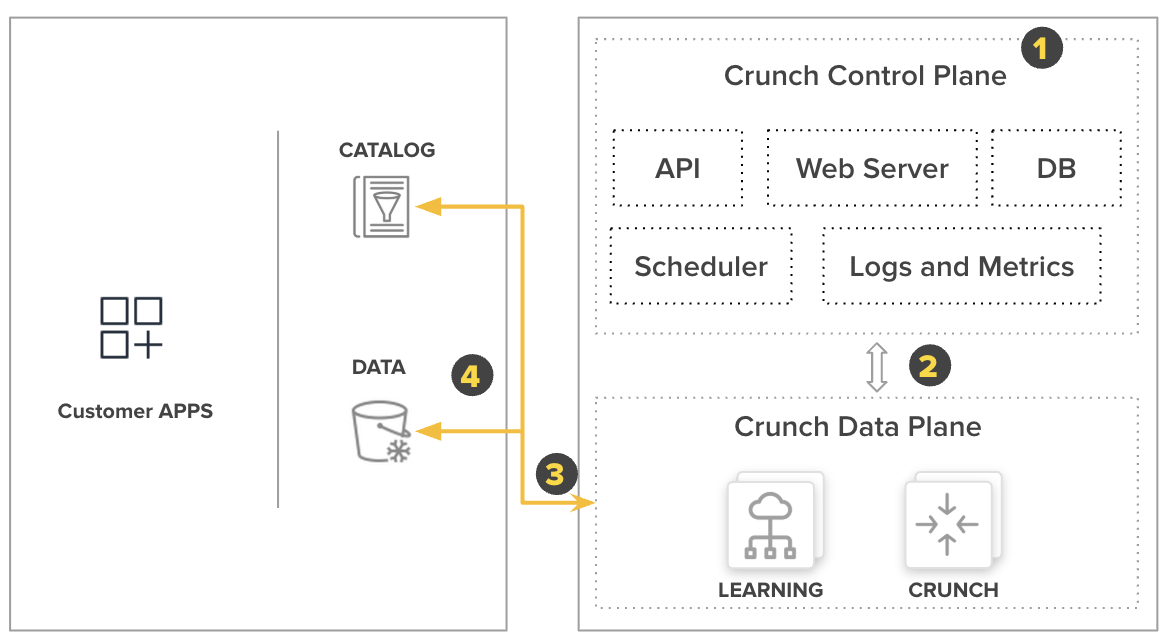
1. An administrator sets a Crunch policy on a table via the Granica Console or API. The Controller retrieves vanilla objects.
2. The Crunch scheduler determines when to process the table based on the configured SLA and policy.
3. The Controller sends vanilla objects to a load-balanced Compression optimizer.
4. The Compression optimizer validates policy eligibility, optimizes the compression and encoding, and commits the optimized files using the table format's native commit protocol (Iceberg or Delta Lake snapshot commit, or direct object replacement for Hive) — initiating a reduction in your monthly cloud storage bill.
Crunch is not in the read path in background mode either. Crunch swaps the original files for smaller, compression-optimized versions. In the case of Iceberg and Delta tables, Crunch commits the smaller, optimized files as a new snapshot or version. Compatible applications will then begin reading the reduced files normally.
Runtime crunch write workflow
In some rare cases, customers may choose to integrate Crunch into their existing ETL engine. In this mode, Crunch has two main components:
-
An ML-powered adaptive compression control system that analyzes your existing columnar files to create compression optimization recipes.
-
A runtime optimizer JAR that integrates into your data platform and is invoked transparently by any application using an open source Apache Parquet writer, without any code changes.
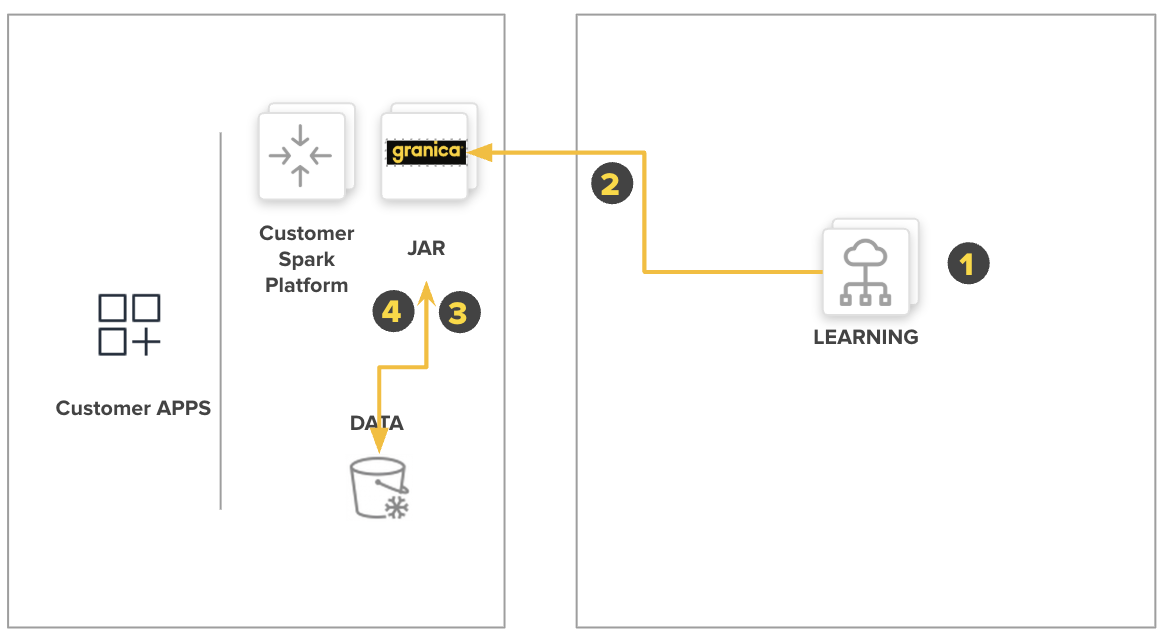
1. An administrator routes vanilla objects to a Compression recipe generator, which analyzes the unique characteristics and structure of the columnar files.
2. The Compression recipe generator updates the Compression recipe store with new or updated recipes.
3. Spark-based applications initiate columnar writes using standard commands. The Granica runtime JAR intercepts the write and applies the best available recipe.
4. The JAR writes data out in standard, lakehouse-native format (typically Parquet).
5. When needed — for example, when a schema change is detected — the runtime JAR notifies an administrator to re-analyze newly created files and update the recipe.
Crunch is not in the read path. Reading Granica Crunch compressed files is transparent — any application using the open source Parquet reader can read them normally.
See also
Granica Crunch overview
A continuous, policy-driven data lakehouse optimization platform for compaction, compression, vacuuming, partition lifecycle management, data ingestion, and query acceleration.
Architecture
Understand the Granica Crunch platform architecture, deployment models, and the separation between control plane and data plane.